REAL HIRE
A video-based "human-first" hiring platform connecting candidates & employers beyond the resume (B2C/B2B)
(Top 10 at Startup World Cup Miami 2024)
Founding team: 1 CEO, 1 CTO, 2 Engineers, 1 Sales, 1 Design (me).
Role: As the 1st designer, I led end-to-end design across B2C and B2B, from validating the early idea to first MVPs to a multi-user B2B2C product. Beyond core product, I established brand identity, monitored user KPIs, designed landing website & established a user-centric culture.
Timeline: 2 years, 8 months (full-time)
Impact:
-
Shipped 7+ launches across iOS, web and B2B, 4.7 App store rating
-
Built the first design system and Figma MCP -> Claude Code workflow that let engineers 3X ship faster
-
Shifted the team to user-first habits by running UX workshops so non-designers could run early user interviews
-
Set up regular feedback loops (interviews, surveys, analytics) that guide design iterations
PROBLEM
Resumes show credentials, but not the human signals behind a great hire.
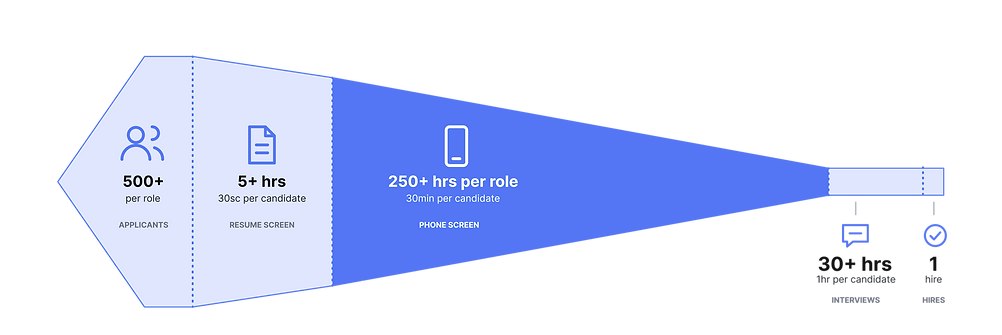
Without a sense of communication, motivation and presence, recruiters fall back on 30-minute phone screens, creating a bottleneck in screening.
BUSINESS
CONTEXT
Inefficient screening costs time, money & talent.
Every wrong hire loses thousands of dollars and countless recruiter hours. Yet, traditional resumes are still being used to screen out 90% of candidates...
IMPACT
30min->2min
Time to assess fit per candidate
30-40%
Reduction in phone screen volume
+25%
Phone screen-to-interview conversion
+20%
B2B platform adoption
Real Hire.
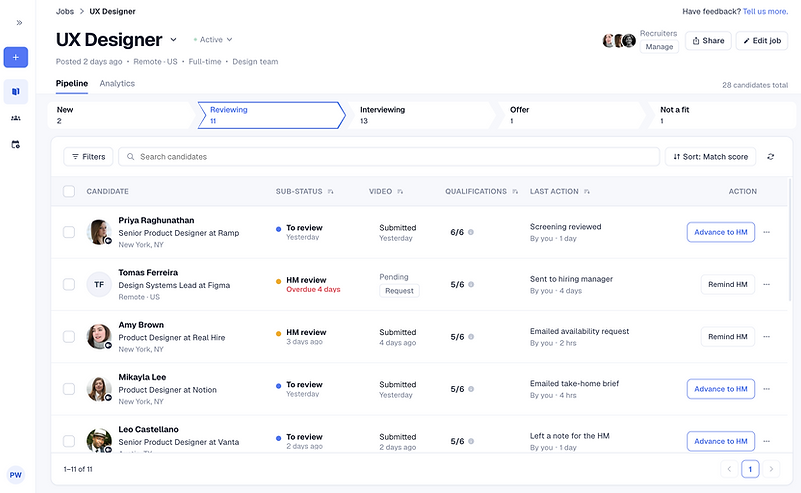
A "human-first" hiring platform that seamlessly integrates video to improve speed & quality in screening.

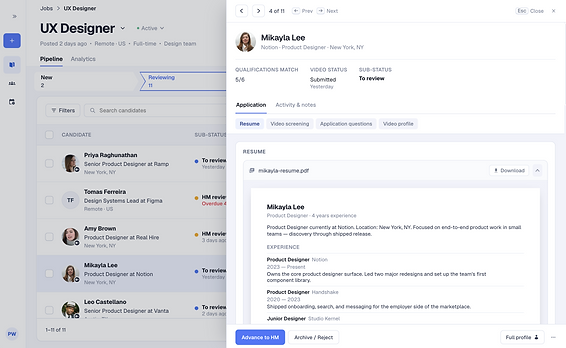
Recruiter sourcing portal | B2B Web
allowing employers to quickly screen video profiles that embed rich human signals
-
Source candidates video profiles
-
Screen videos submissions from applications
-
Create engaging video job posts
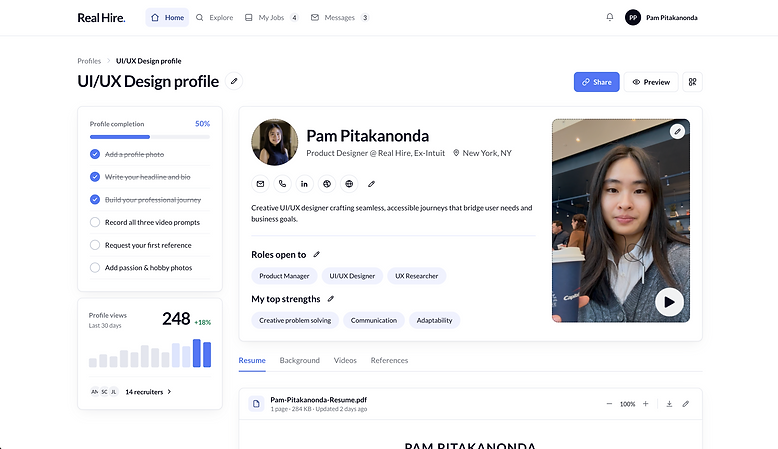
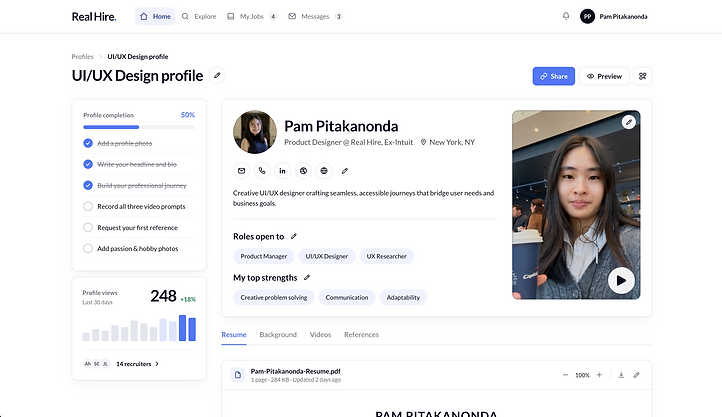
Candidate video profiles | B2C Web, iOS
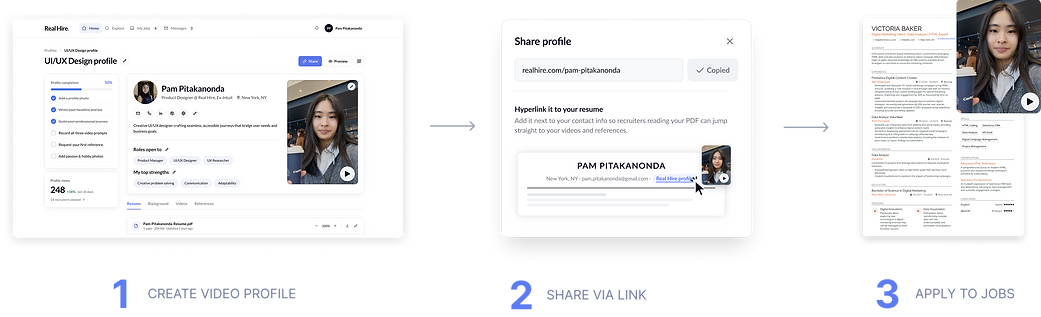
that showcase who they are, sharable as a hyperlink on your resume
-
Create a personable video profile
-
Shareable URL to resume & LinkedIn
-
One-click apply to jobs with video profile

RESEARCH
In a founding team of 4, I led early user discovery to validate a bottleneck in the screening stage.

User interviews with 15+ Candidates, 15+ Recruiters & 10+ Hiring Managers revealed...

RESEARCH
What we heard from recruiters...
1) Time
Recruiters rely on 30-minute phone screens for basic fit, often knowing within 3 minutes if a candidate is a fit.
2) Trust
Early signals are difficult to verify. Resumes exaggerate and communication remains unseen until the phone screen.
3) Volume
Recruiters are overloaded, relying on shallow heuristics (qualifications, hard skills, names) & their gut instinct.
This set 3 requirements. Video had to be:
DEFINE

1) Fast
Under 3 minutes

2) Credible
Alongside the resume, not replacing it

3) Scalable
No extra work per candidate
CONCEPT
TESTING
Recruiters made faster, more confident decisions with video next to the resume.
I tested resume-only vs resume+video, measuring time-to-screen and confidence with 12 recruiters. They rated higher confidence and expected fewer phone screens downstream.

MVP
STRATEGY
Recruiters wouldn't switch tools, so I designed for existing workflows with a light B2C MVP
A full two-sided marketplace would take months and recruiters weren't ready to switch tools. So I designed a video profile candidates hyperlink on their resume, creating a simple way for recruiters to access video & test the core value prop with zero behavior change. Every job application put the product in front of recruiters (built in GTM strategy).
Once recruiters began reaching out to us, I began designing the B2B portal.
DEFINE
Designing the B2B architecture using decision layers
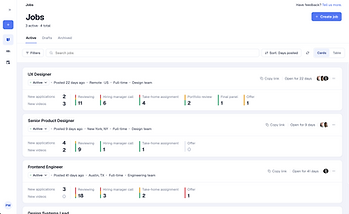
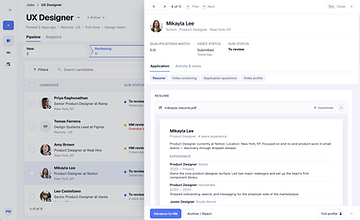
I designed a recruiter flow that supports decision progression, moving from broad pipeline scanning to deep evaluation. Each layer needed different degrees of speed vs depth and stayed focused on one question.
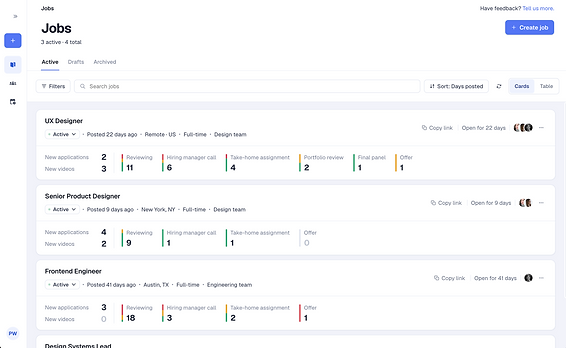
1) What job needs attention?
Understand macro pipeline health
2) Who needs my attention?
Scanning & triage

3) Should I move this person forward?
Deep evaluation
DEFINE
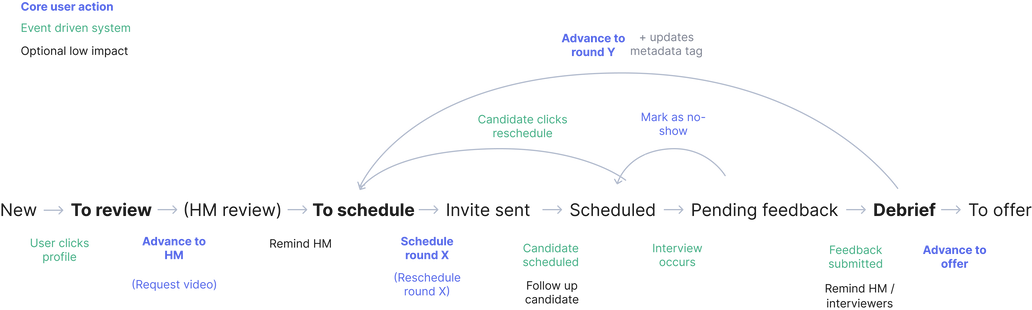
Mapping the underlying states of a multi-user system, driven by one "move stage" click with many consequences
Moving a candidate updates pipeline counts, notifies hiring managers and emails candidates etc. Every company also used video at a different point, so I designed fixed global stages with flexible substages, and made video as a property of substage.
Two rules that drove the whole UI: 1) Every substage has one owner blocking it (recruiters, hiring manager, interviewer or candidate). 2) System facts are styled differently from user decisions.
IDEATION
Balancing depth of evaluation vs context preservation
My initial instinct for each candidate screening was a full in-depth page. After exploring a range of interaction patterns that optimized for different mental models through greyscale prototypes testing with 10+ recruiters, I discovered one that matched their mental model.

User insight: Recruiters scan candidates one-by-one but judge against a pool.
Solution: I used a 40:60 overlay side panel that balanced depth vs context preservation, allowing recruiters to evaluate candidates on-by-one while keeping the candidate pool visible. I further designed micro-interactions in the side panel that optimized for speed.
CONSTRAINT
Recruiters valued video but wouldn't adopt, so I designed around how they multitask
User insight: Video forced recruiters to stop and watch, which broke their fast multitasking workflow.
Solution: I designed a picture-in-picture interaction that enabled recruiters to take in human signals during their usual multitasking workflow. Engineering pushed back on full picture-in-picture, so I shipped a sticky video player to test the idea first. It reached 90% feature usage.
SOLUTION
A picture-in-picture side panel interaction that increased platform adoption +20%

DESIGN
SYSTEM
Built a Figma -> Claude Code system that let engineers ship 3X faster
Fast early shipping left design and code drifting apart. I established tokens, styles, components & design patterns directly in code as the source of truth and pushed UI changes as PRs for engineering review.
I designed slot components for scalability. This video component allowed a new picture-in-picture interaction by adding one control set variant and reusing 1) interaction states, 2) video states, 3) control sets, 4) surfaces


FINAL SOLUTION




REFLECT
1. Navigate ambiguity by experimenting & creating structure
I learned to independently design a structured UX process from scratch - laying out the appropriate design workflows, creating a scalable design system and maintaining UX documentation to keep my team aligned. I learned to adapt to changing business needs and create structure for defining the problem space, ideating solutions, seeking feedback & systematic handoff.
2. Test early & often - feedback is crucial
I saw how testing EARLY was key. It resulted in less time spent fixing & pivoting and drove deep insight that shaped design decisions at vital stages. Early prototyping & rounds of usability testing revealed insight that allowed the team to pivot towards better MVPs. When the team understood the value of feedback, there was greater buy in and each product transformation was a huge leap towards PMF.
3. Alignment is key
I learned that it is essential to communicate UX needs and align them with stakeholders across technical & business & marketing. Early on, I experienced a time when each team member had a different understanding of our product based on personal experiences, which hindered important decision-making & prioritization. I spearheaded team UX workshops to clearly define our problem, users & solutions and created shared systems to record/communicate key iterations.
4. Evangelize UX for better cross-collaboration
As the only designer, I was challenged to demonstrate the value of deep user research & feedback by guiding the team through "why" behind each stage of the design cycle. I incorporated strategies to increase team user empathy: sharing user interview snippets, leading ideation/synthesis/UX workshops, presenting user insights behind design decisions and connecting UX to business impact. I showed my team why we should challenge PMF assumptions, enabled collaborative feedback gathering/ideation, and advocated for user needs in core company meetings.
More projects:


Let's connect!
If you like what you see, I'd love to chat!
Alternatively, here's a fancy sheet of paper:
